Gadgets and Tech Reviews

Showing posts with label Website. Show all posts

Monday, May 23, 2011

How To Find Out Who Unfriend You On Facebook Or Twitter

Sometimes we’re all so preoccupied with gaining friends and followers that we’re sometimes missing one of the most important metrics we can use to measure our performance on social media sites – who’s unfollowing us?

 facebook_logo

While both Twitter and Facebook are all too keen to send us emails and notifications when we gain a follower or friend, there is are no such notifications when someone deems us no-longer worth keeping an eye on – something that can often help us improve the way we interact with people online.

This is where TwentyFeet comes in.

What TwentyFeet does is tie into your Facebook and Twitter accounts (one of each if you’re going for the free service). From here on TwentyFeet will monitor your accounts for when someone removes you as a friend or, in Twitter’s case, unfollows you.

 twitter-logo

Obviously if you lose a friend on Facebook it’s possible they have jumped ship completely and deemed the network’s odd privacy issues just too much of a sticking point to overcome in order to farm some imaginary fruit but if not, just knowing who they are could help you prevent the loss of more people in future.

Check out the company’s explanation video for more information.

TwentyFeet is free for two accounts, with a business account available for just $2.49 per additional social media account.

Tuesday, May 17, 2011

Microsoft And Baidu To Partner A Big Search Deal In China To Take On Google (REPORT)

Looks like Microsoft is on a roll these days, after acquiring Skype for a whooping $8.5 Billion, reports in Chinese press now suggests that Microsoft is on the verge of announcing a deal with Chinese search giant Baidu.

Screen-shot-2011-05-15-at-18.26.46 Bing is currently an also-ran in Chinese search and any potential deal with Baidu could help Microsoft’s relatively new search business take off in the country.

Reports in China suggest Baidu could be about to take over the paid ads on Bing’s Chinese site while Microsoft would offer English language results for Baidu in return.

According to sources, Baidu will be Microsoft’s strategic agreement signed this weekend, both sides will cooperate in the search field to reach, but still unaware of the specific details of cooperation. Insiders speculate that Microsoft will be in the (bing) provided to use Baidu’s bid ranking service.

Reports also suggest a deal could be announced as early as next week.

Bing isn’t the only US-based search company having problems in China, with Google also struggling to make a dent in Baidu’s huge user base. Microsoft’s partnership with the big boys of Chinese search could see Google pushed even further down the pecking order.

Monday, May 16, 2011

Make Your Facebook Account More Secure With ‘Login Approvals’

Security is high on everyone’s list of priorities these days, especially with Sony still battling to bring its PlayStation network and Qriocity services back online after a security breach potentially leaked millions of users’ personal information. Now Facebook is offering a new tool to try and prevent unauthorized access to your account.


The new system uses
two-factor authentication and offers an extra level of security over the basic settings. What the new option does is send an SMS message to a chosen mobile phone number each time a new and unauthorized computer tries to sign into your account. If the attempt is legitimate you can choose to allow access, but if not then you’ve just been alerted to a potential security breach.

As more individuals and businesses turn to Facebook to share and connect with others, people are looking to take more control over protecting their account from unauthorized access. Login approvals is a Two Factor Authentication system that requires you to enter a code we send to your mobile phone via text message whenever you log into Facebook from a new or unrecognized computer. Once you have entered this security code, you’ll have the option to save the device to your account so that you don’t see this challenge on future logins.

If you are unfortunate enough to lose your registered mobile phone then fear not, for you will still be able to change your settings so long as you use a previously authenticated system.

You can turn on Facebook ‘Login Approvals’ feature under: Account Settings –> Account Security. Make sure you have your mobile phone on hand so that you can receive a code via SMS which is required to authenticate your computer.

The Ten Nations Where Facebook Rules The Internet

24/7 Wall St. looked at the ten countries in which Facebook has tremendous dominance of the online market. Most are concentrated in Latin America or Southeast Asian countries, including the Philippines and Indonesia. There is no obvious explanation for this except that some of these markets are among the first where Facebook introduced its service.

24/7 used data from comScore, Inside Facebook, New Media Trend Watch, and ZDNet to do its analysis.

These are the Ten Nations Where Facebook Rules The Internet:

10. Venezuela
> Facebook: 86.2%
> Twitter: 21.0%
> LinkedIn: 3.2%
> Internet Use: 37.7%

Venezuela has the third highest rate of Twitter use among Internet users. According to research firm comScore, 21% of Venezuela’s Internet users have Twitter accounts. The only countries with higher percentages are Indonesia and Brazil. America, by comparison, has a usage rate of 12%, the eleventh highest. Social media also plays a large role in Venezuelan politics. Hugo Chavez, the country’s president, has 1.5 million Twitter followers. He is the second-most followed political figure, behind only Barack Obama.

9. Colombia
> Facebook: 86.9%
> Twitter: 14.6%
> LinkedIn: 3.3%
> Internet Use: 48.7%

More than 86% of Colombians visited a social networking site in September, with Facebook leading the category. Visitors averaged 4.6 hours on the site during the month. Nearly 7 out of 10 Colombians visited a photo sharing site in September 2010 led by Facebook.com. Colombia is the fastest-growing Internet market in Latin America, growing 31% in the past year to reach 11.8 million unique visitors in September 2010, according to comScore. Facebook is by far the most popular social networking site in the country, with visitors having spent an average of 4.6 hours on the site during one month, of a total 20.4 hours spent online.

8. Peru
> Facebook: 87.2%
> Twitter: 12.5%
> LinkedIn: 4.6%
> Internet Use: 27%

Although a large portion of Peru’s Internet users are involved with social networking websites, it has a relatively small minority of people who use the Internet at all. As of January 2011, only 27% of Peruvians were online, one of the lowest rates among the Latin American countries. Peru also had the second slowest growth among Latin American countries of Internet users in 2010, according to Inside Facebook. The only country to have slower growth was Brazil.

7. Indonesia
> Facebook: 87.5%
> Twitter: 22.0%
> LinkedIn: 1.3%
> Internet Use: 12.3%

Social network penetration in Indonesia is the third greatest in Southeast Asia as of the beginning of 2011, at 90% of those people online. According to comScore, the country’s high adoption rates are due “almost exclusively” to Facebook. In January 2011, 22% of Indonesian Internet users visited Twitter, the fourth-greatest share among all countries. Indonesia, however, has the smallest percentage of Internet users among the countries on this list — 12.3%.

6. Malaysia
> Facebook: 88.4%
> Twitter: 10.8%
> LinkedIn: 2.9%
> Internet Use: 64.6%

Malaysia has the second-highest social network penetration in Southeast Asia, with 91%. One of the most increasingly popular social-networking activities in the country is photo-sharing on sites such as Facebook. From 2009 to 2010, the popularity of online photo-sharing increased by 57% in Malaysia. This is the second greatest percentage among Southeast Asian countries.

5. Argentina
> Facebook: 89.2%
> Twitter: 18.0%
> LinkedIn: 6.4%
> Internet Use: 64.4%

Facebook has become extremely popular in Argentina recently. As of May 2011, Argentina’s penetration rate was 89.2%. 27.8% of minutes spent online in Argentina are spent on social networks, making the category the second most popular online destination. The first is portals.

4. Chile
> Facebook: 90.2%
> Twitter: 14.3%
> LinkedIn: 5.9%
> Internet Use: 50%

Chile has among the highest rates of Internet use among Latin American countries, with 50% of Chileans online. According to comScore, 28.5% of all minutes spent online in Chile are spent on social networking sites, up 8.9 percentage points from the previous year. This makes it the most popular activity online based on “minutes used.”

3.Turkey
> Facebook: 90.9%
> Twitter: 16.6%
> LinkedIn: 3.4%
> Internet Use: 45%

Turkey has the highest Facebook penetration among all the Eurasian countries, with a rate of 90.9%. The second highest is the UK, with 81.7%. Internet users in Turkey also spend the third greatest amount of time on social networking sites among all nations, behind only Russia and Israel. The average Turkish social network visitor spends 7.6 hours a month on social networking sites.

2. Israel
> Facebook: 91.0%
> Twitter: 5.0%
> LinkedIn: 6.4%
> Internet Use: 71.6%

Israel has the highest rate of Internet use among the countries on this list, with 71.6% of the country’s population being “plugged in.” It is also very involved with Facebook. Besides having the second highest rate of Facebook usage among Internet users, Israelis spend the second most amount of time on social networking sites, behind only Russia. Israel’s social network users spend an average of 9.2 hours on social network sites a month.

1. Philippines
> Facebook: 93.9%
> Twitter: 16.1%
> LinkedIn: 1.9%
> Internet Use: 29.7%

Social network penetration is incredibly high in the Philippines, reaching 95%. Facebook is the country’s most popular website, more so than Google, and has a penetration rate of 93.9%. The Philippines is also the eighth most popular country for Twitter use on a global scale, with a penetration rate of 16.1%. The popularity of photo sharing has increased by 46% in the country in one year, largely due to Facebook. Social networking is so popular among Filipinos, the country has been nicknamed “The Social Networking Capital of the World."

Friday, January 23, 2009

iPhone 3rd party Internet Browser now Available at App Store


iPhone users will now have an option as to what browser to use when surfing the web as Apple has approved 3rd party internet browsers to be featured on the App Store. Among the first batch of approved internet browsers, the Edge Browser (shown in the picture) stands out as it provides full screen browsing and, more importantly, is free. If anonymous surfing is your thing, the Incognito browser will come in handy, but it’ll set you back $1.99 to use it. The Webmate browser, meanwhile, provides tabbed browsing and costs less than the Incognito at just $0.99 to download.

With this latest turn of events, we’re now a bit more optimistic of the chances that we will one day see Mobile FireFox and Opera Mini become available on the iPhone.

Saturday, November 22, 2008

iPhone Google Mobile app now Supports Voice-Recognition

Here’s some news that might interest all of you iPhone owners out there. Google has just released the latest version of Google Mobile app which now includes voice-recognition functionality. This basically means you don’t have to type in a search query anymore in order to perform a search.

Just run the application, place the iPhone near your ear as if you were making a call, and tell it what you want to search for. It’s that easy. It automatically enables voice command functionality when you place the iPhone near your ear thanks to the proximity sensor that’s built-in the device. Voice commands are currently limited to US English only, but additional language support will be provided as part of future updates. This new version of the Google Mobile app likewise comes with Search with My Location which basically provides a localized search based on your current location. It’s a great additional feature, but I don’t think it works here in the Philippines.

Anyway, the all-new and improved Google Mobile app is now available via the App Store, and what’s even better is that it’s completely free. Check it out for yourself and tell us what you think about it.

Thursday, November 13, 2008

Philippine Online Apple Store now Open

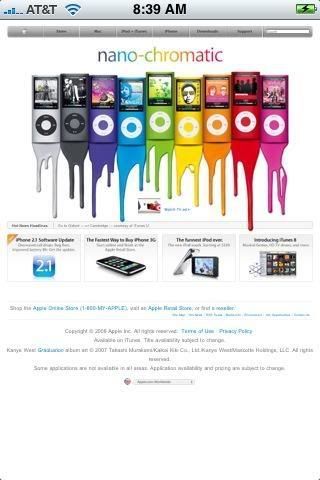
First, there was only the iTunes Store. Now, you can likewise order iPods, Macbooks, iMacs and other Apple related products direct from the online Apple Store. Yes, that’s right. Philippibe online Apple Store is now open for business.

Apple Store Philippines now Open

According to Yugatech, orders made from the website will be shipped directly from the regional hub in Asia and only takes 1-2 business days. Purchases that are more than P3000 qualify for free shipping as well.

Free T-Shirt

In line with this momentous event, Apple is also giving away exclusive limited-edition T-shirts to all those who make a purchase from now until November 28. It might not be one of the most wickedly designed shirts to date, but if you’re a true blue Apple fan boy, I’m sure you’d love to have one.

The price of their items are not the cheapest as far as the local market is concerned, but at least you can now order from the convenience of your own PC (or Mac) and have your Mac goodies delivered straight to your doorstep.

Thursday, November 6, 2008

XPERIA X1 site Now Up and Running

rue to their word, Sony Ericsson has launched an XPERIA X1 site where you can sign up to be one of the first to own their new mobile phone.

Sony Ericsson XPERIA X1 pre-order site now live

This site not only caters to Philippine residents, but is also applicable to Indonesians and Malaysians as well. You just need to enter your name, e-mail address and mobile phone so that you’ll be informed once the XPERIA X1 is available for purchase in your country.

We have it on good authority that the big day will be on November 14 as far as the Philippines is concerned, and the price is just a hairline below P40K. That gives you approximately two weeks to save up for this Windows Mobile-powered smartphone, but if you’ve been patiently waiting for the XPERIA X1’s arrival in the local market since its announcement way back in February, you probably would have saved up enough money to buy one unless, of course, you were swayed by your friends to buy a 3G iPhone. If not, then your long wait will soon be rewarded by a brand new touchscreen-enabled, QWERTY-equipped, Windows Mobile smartphone that’s been well crafted by the hard working folks of Sony Ericsson.

Tuesday, October 7, 2008

Asia’s Top 10 Internet Countries

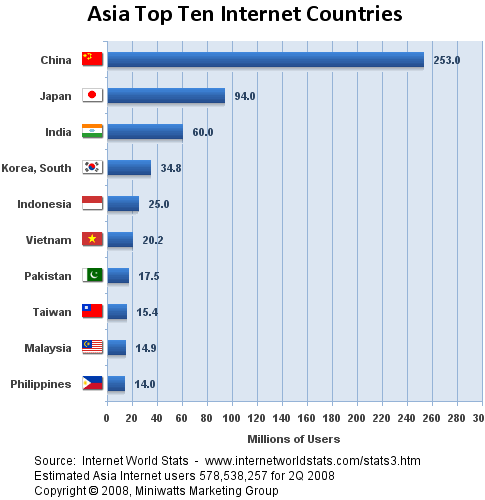
In the latest report by InternetworldStats, the Philippines took the #10 spot with the most number of internet users at 14 Million, just 900k lower than Malaysia at #9.

That number represents 15.1% of the total population of the Philippines {via}. That’s still a low internet usage density though.

internet stats

China tops the list at 253 Million followed by Japan at 94 Million and India at 60 Million.

As for internet penetration, the Philippines is still way down the line, esp. in South East Asia:

Japan: 73.8%
South Korea: 70.7%
Hong Kong: 69.5%
Taiwan: 67.2%
Malaysia: 59%
Singapore: 58.6%
Macau: 51.6%
Brunei: 46.2%
Vietnam: 23.4%
Thailand: 20.5
Philippines: 15.1%

What’s surprising again is that Vietnam (86M), which has almost the same population as the Philippines (92M), has higher number of users and internet penetration.

No wonder why Vietnam took the top spot in SEA during the Firefox 3 Download Day.

Wednesday, September 24, 2008

Silly Sites

The world loves Wikipedia, flocks to Flickr, and checks in Facebook or surfs into Nokia’s Ovi.

And why not? Sites like them harness collective knowledge, promote interaction and communication, and improve the more you use them.

Unfortunately, not every website is a winner. A lot are vague, pointless, or just plain silly. How do you identify a dumb site? First, the site’s mission statement must be impenetrable. Second, the site must solve a problem that has been solved a million times already or didn’t need solving in the first place. Third, its name must love the letter "r" but eschew vowels (Drivl, Grazr, Hngry).

Here are some of the silliest sites I’ve seen so far:

Blabberize (www.blabberize.com)

If you were a venture capitalist and some supposed Web visionaries came to you with a home page dominated by an animated picture of a talking alpaca, wouldn’t that in itself be enough to make you say "No thanks"? Apparently not in the case of Blabberize, which lets users add audio and animate the mouths in pictures. At least it’s entertaining, right?

BillMonk (www.billmonk.com)

Let’s say you owe a friend some money and you ask him for the money but friend says that the debt has been paid. How embarrassing! If you were using BillMonk -- "a free service that makes it easy to track expenses between friends, and to settle them up instantly online" -- you wouldn’t be in this fix. According to its creators, BillMonk is particularly popular with roommates, college students, and other folks who can’t communicate via vocal cords or post its.

Blippr (www.blippr.com)

The Short Attention Span Theater isn’t gone -- it just moved to the Web. I Blippr, for example, lets you review movies, books, games, and so on, in 160 characters or less. This setup results in such trenchant appraisals as "Some dude eats this fast food joint every single day until he gets fat and becomes really sick" ("Super Size Me") and "this is a fine specimen of bookage" ("The Hitchhiker’s Guide to the Galaxy").

FoodFeed (www.foodfeed.us)

"Had donuts for the past week and now I even see them in my dreams." Don’t keep such morsels to yourself. Thanks to FoodFeed, you can share your eating habits with the world! Mike in Utah hoovered 2 footlongs ten minutes ago. Ryan in Canada just wolfed down a huge bowl of ice cream and Tonito in Makati just ate something complicated. Bon Apetit!

Predictify (www.predictify.com)

Exercise your inner Nostradamus. At Predictify, you don’t just read the news -- you predict it! If you’re accurate, you can earn real money. But who’s coughing up the dough? "Premium question-askers" who could be vendors, marketing firms, pollsters, or individuals who truly want to know "Will Paris Hilton’s energy plan be adopted wholly or partially by Congress this year?" In typical Web 2.0 fashion, you can connect with other members, compare rankings, challenge their predictions, and so on. The convoluted rules, however, may send you running back to Greedy or Needy.

Savvy Auntie (www.savvyauntie.com)

There’s a first for everything - eating frog’s legs, jumping off the cliff at Tali, being an Aunt. Enter Savvy Auntie, a network for women who desperately need tips on being an aunt or grandmother. Just incase you don’t trust your relatives who help you along the way, in the site you learn how to sing "Itsy Bitsy Spider" or how to throw a "High School Musical" theme party. You can also tap into Auntiepedia, a wiki that boasted two postings when I checked. Uncles need not apply, as they are superfluous.

BarbieGirls (www.barbiegirls.com)

Want to raise a good little consumer? BarbieGirls.com is the place for your princess to log in and get down. With the free account, she can design her virtual character, decorate her room, chat with new friends, and visit their rooms. But step up to VIP membership ($ 6 per month), and we’re into amassing virtual purses and jewelry, sending gifts, staging a fashion show, getting a special tiara and hairstyle, and, of course, earning Barbie-bucks. Paris Hilton in the making? Loves it.

Wednesday, September 17, 2008

Google Chrome Beta

I’ve heard about it, downloaded it, installed it, and used to our heart’s content.

I'm a bit amazed but not totally surprised and this is what i’ve seen on Google Chrome so far.

Go to www.google.com/chrome and from there, you can download an installation file but not exactly the whole program (or read more info about the application.)

Run the installation file and from there it’ll automatically download the Beta version and you’re done. Chrome will also ask if you want to import bookmarks and other stuff from your default browser.

Shimmering simple

No menu bar, no big icons, and no status bar. Those who are used to using IE or Firefox may be surprised with the Chrome’s uncommon appearance.

All you get are small icons, the address bar, and a default bookmark folder located on the upper right side of the window. These aren’t really new and works fairly the same with most tabbed browsers, but where do you access its other features?

On the upper right corner, just above the bookmarks folder, you’ll see a paper-like icon and a wrench icon. When your mouse pointer hovers above the former and it displays "Control the current page," click and you see similar controls like "New tab" (Ctrl+T), "New window" (Ctrl-N), "Cut" (Ctrl+X), "Copy" (Ctrl+C), and so on. You’ll also notice that most keyboard shortcuts have more or less the same commands.

What’s new? Well, "Create application shortcuts" is one feature new to us as this lets you create a shortcut for a specific web page. This is an alternative to using the bookmark, and the shortcut can be placed on either your desktop, Start menu, or Quick launch bar, or on all three locations.

You haven’t heard of a browser that has its own task manager have you? Chrome has one for the reason that each tab opened is a separate process by itself. Go run your operating system’s own task manager and you will see for yourself.

Why is this so? Perhaps to prevent work interruptions if you happen to work online most of the time. And it’s pretty annoying when your OS suddenly tells you that you browser is "not responding" and needs to be closed. In Firefox or Seamonkey, running the application again would ask you if you want to "restore your last session."

No matter how many tabs you have opened, they will be opened on the last known page you’ve been to. Of course, with emails, you have to re-log-in (and there might not be any assurance that composed messages are saved unless you’re used to pressing Ctrl+S every now and then).

Now, if you want to control or tweak Chrome’s behavior as an application, this is where you have to click on the wrench icon ("Customize and control Google Chrome"). Choose "Options" from here and a window opens up, showing you three tabs - "Basic," "Minor Tweaks," and "Under the hood."

You can let Chrome automatically open the pages you’ve visited on your last session once you run it (and it will do it all the time unless you change it in the options to either open the home page or specify certain URLs to be opened).

Let’s say you often check you mail, visit a forum site, and read sources Wikipedia on a daily basis, you don’t have to open three tabs and type in their URLs or open them from your bookmarks. All you have to do is log in and wait.

The standard home page for Google Chrome shows you a history of recently-viewed pages in a thumbnail-like manner. And its interactive, meaning it’s already a link to those pages. Click the "show full history" and you have a track record of your internet activities for the past several days.

And the usual stuff here allows you to control settings on downloads, passwords, fonts and languages. For nerds, check "under the hood" because this is where the network, web content and security settings can be changed.

So far, the Beta version of Chrome is quite impressive in terms of performance. Although it may show signs of lag on old PCs (like on one unit we installed), it hasn’t crash yet. And there’s still more to expect from Chrome in the coming months so this isn’t the end of the road yet.

Click here for the battle of the 3 BIG WEB BROWSERS (Firefox 3, Internet Explorer 8 Beta, Google Chrome)

visit my blogspot at http://gadgetechreviews.blogspot.com/

Friday, August 15, 2008

Wikipedia founder ready to break Google strangehold


Watch out, Google. Wikipedia founder Jimmy Wales hopes that Wikia Search, a project he spearheads, will break Google's domination as the world's most widely used Internet search engine.

Google and fellow titans Yahoo! and Microsoft dominate the Internet search engine market which Wales said was already causing some worry among web users.

"Right now in the US in particular we have a really strong concentration of the industry," Wales said Thursday at the Global Brand Forum in Singapore.

Industry statistics showed over 90 percent of Internet searches in the United States are done through the three firms, he said.

"So a lot of people are really concerned about this... Do we really want all of our traffic, all of our editorial control of the Internet all being piped through one, two or three companies? I don't think we do... I think we want to have a broader marketplace than that."

Wales said Wikia Search will run on an open platform, similar to the principles behind Wikipedia, the popular online encyclopedia in which entries can be made and edited by anyone with an Internet connection.

"All of the existing search engines are proprietary black boxes," said Wales. "You have no idea how things are ranked and what's going on."

With Wikia Search, users "can participate in meaningful ways" when they browse the Internet, he said.

Tuesday, August 12, 2008

How many words are your pictures worth?

Speechable.com (http://speechable.com/) is a new, free website that lets you easily upload and add speech bubbles to any photo and share them with friends via email or on popular social networks like Facebook®, MySpace®, Orkut, blogs, and message boards or you can share them with folks you’re just not that fond of. No registration required.

To use Speechable, upload a photo, then select a balloon and add text. Use the buttons below to resize your font, and resize the balloon by clicking its lower right corner. Grab the top line of the balloon to move it.

Speechable is a handy tool for inside jokes, quick blog posts, and whatever else needs a little comic strip flair. Once you’ve added your witty commentary to your photo and saved it, an optional link lets you convert it to a private photo, but otherwise anyone can share and comment on your comic genius in the gallery or on your iGoogle homepage.

Have Fun!

Wednesday, August 6, 2008

Do you want free software?

Are you looking for a software?

A legitimate software that is. Here’s a site that offers free website - Giveaway of the Day (http://www.giveawayoftheday.com)

Every day the site nominate one software title that will be a Giveaway title of that day. The software will be available for download for 24 hours (or more, if agreed by software publisher) and that software will be absolutely free. That means - not a trial, not a limited version - but a registered and legal version of the software will be free for our visitors.

The software product will be presented in its full functionality, without any limitations save for those mentioned in Terms and Conditions.

The download link will remain on Giveaway of the Day web-site for the agreed period of time, together with the review of the software product and the information about other products from the software publisher presenting the giveaway title.

Now who said there’s nothing free in this world. Have Fun!

WorldWide Telescope (WWT) Application


Microsoft unveiled a public beta of its WorldWide Telescope (WWT) web application that allows star gazers and astronomers deep into the universe Tuesday.

"The WorldWide Telescope is a powerful tool for science and education that makes it possible for everyone to explore the universe," said Bill Gates, chairman of Microsoft. "Our hope is that it will inspire young people to explore astronomy and science, and help researchers in their quest to better understand the universe."

Users could surf the skies from their desktop via this software. The software creates an experience that users of all ages will find captivating, said Frank Reddy, a senior editor at Astronomy Magazine.

Powered by a mix of software and Web 2.0 services created with Microsoft's Visual Experience Engine, WorldWide Telescope uses a massive database containing several terabytes of high resolution images of stars, galaxies, and other heavenly bodies.

It combines terabytes of celestial images and other data that users can pan across using a viewer that employs Microsoft's Visual Experience Engine.

The images come from a variety of space- and Earth-based sources, including the Hubble Space Telescope, the Chandra X-Ray Observatory Center, and the Spitzer Space Telescope.

The service is free, and is dedicated to the memory of Microsoft researcher Jim Gray, who went missing at sea last year. Microsoft said much of the technology in WorldWide Telescope is built on Gray's original SkyServer project.


Download - http://content.worldwidetelescope.org/setup/setupwwt.exe

Official Site - http://worldwidetelescope.org/